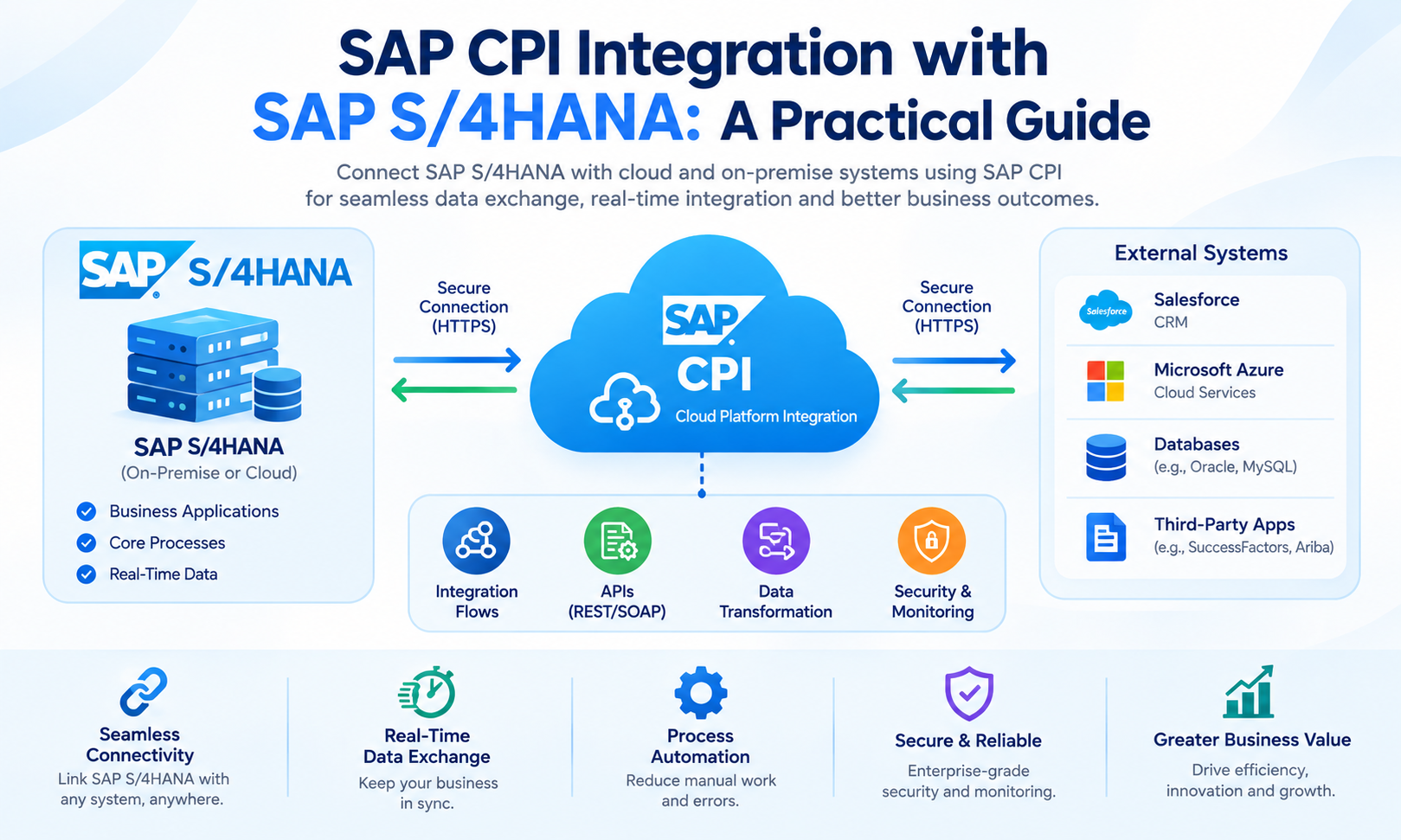
SAP S/4HANA is an enterprise resource planning platform used to manage business processes such as finance, sales, procurement, manufacturing, supply chain, and human resources. Organizations often need to connect SAP S/4HANA with cloud applications, third-party platforms, partner systems, databases, and other SAP solutions.
SAP CPI Integration provides a cloud-based integration layer for these connections. The current SAP product terminology is Cloud Integration, which is a capability within SAP Integration Suite on SAP Business Technology Platform (SAP BTP). Cloud Integration supports SAP and non-SAP applications across cloud, on-premise, and hybrid landscapes.
An integration flow, commonly called an iFlow, defines how messages move between systems. It can receive information from SAP S/4HANA, transform the message, apply routing or business logic, and send the result to another application. SAP also provides integration packages and prebuilt content for supported integration scenarios through SAP Business Accelerator Hub.
What Is SAP CPI Integration with SAP S/4HANA?
SAP CPI Integration with SAP S/4HANA means using Cloud Integration as an intermediary between SAP S/4HANA and another system.
The connected application can be a cloud service, SaaS platform, business partner system, government platform, or another enterprise application. Cloud Integration receives the message, processes it according to the configured integration flow, and delivers the required data to the target system.
A basic architecture looks like this:
SAP S/4HANA → SAP Cloud Integration → External Application
The reverse direction is also possible:
External Application → SAP Cloud Integration → SAP S/4HANA
SAP documentation confirms that SAP Integration Suite can exchange data between cloud systems and on-premise applications. This makes the platform suitable for hybrid integration architectures where SAP S/4HANA remains on-premise while other applications operate in the cloud.
Why Use SAP CPI Integration with SAP S/4HANA?
SAP S/4HANA can participate in complex enterprise landscapes containing many applications. Direct point-to-point connections between every application can create multiple interfaces that become difficult to maintain.
SAP CPI Integration provides an integration layer between systems. Instead of requiring every application to implement separate integration logic for every other application, Cloud Integration can centralize message processing, transformation, routing, and connectivity.
For example, an organization may connect SAP S/4HANA with a CRM platform, e-commerce application, warehouse system, and external tax service. Each integration flow can define the required data structure, communication method, and processing logic.
SAP describes Cloud Integration as a capability for building and running integration flows across cloud, on-premise, and hybrid landscapes. It supports application-to-application, business-to-business, and business-to-government scenarios.
SAP S/4HANA Integration Architecture
A typical SAP CPI Integration architecture contains several layers.
The first layer is the source or sender system. This can be SAP S/4HANA or an external application.
The second layer is the communication interface. Depending on the scenario, this can use technologies such as HTTPS, REST, SOAP, OData, or IDoc.
The third layer is the Cloud Integration runtime. The integration flow processes the message and performs tasks such as mapping, routing, validation, filtering, enrichment, or content modification.
The final layer is the receiver system. This may be another SAP application, a cloud service, a partner system, or a third-party application.
The architecture can therefore be represented as:
Sender → Adapter → Integration Flow → Processing → Receiver Adapter → Target System
SAP documentation describes an integration flow as a model containing senders, receivers, adapters, message-processing steps, and message flows.
SAP S/4HANA to SAP CPI Connection
The connection between SAP S/4HANA and SAP Integration Suite depends on the S/4HANA deployment model and the integration scenario.
For supported scenarios involving SAP S/4HANA Cloud Private Edition or on-premise SAP S/4HANA, SAP documentation identifies SAP Cloud Connector as part of the connectivity setup. SAP’s integration documentation also describes configuring Cloud Connector and iFlows for connecting SAP Integration Suite to SAP S/4HANA Cloud Private Edition.
For SAP S/4HANA Cloud scenarios, communication arrangements and communication systems can be part of the setup. The exact configuration depends on the SAP S/4HANA edition, business process, API, and integration package.
Therefore, the connection procedure should always be matched to the specific S/4HANA environment.
SAP Cloud Connector in SAP S/4HANA Integration
SAP Cloud Connector is important in many hybrid integration scenarios.
It provides a controlled connection between SAP BTP services and systems located in an organization’s private network. This can allow Cloud Integration to communicate with an on-premise SAP S/4HANA system without directly exposing internal systems to the public internet.
SAP documentation for connecting SAP Integration Suite to SAP S/4HANA Cloud Private Edition specifically lists Cloud Connector configuration as part of the connection process.
A simplified hybrid architecture is:
SAP S/4HANA On-Premise → SAP Cloud Connector → SAP Integration Suite → Cloud Application
The exact network and security architecture depends on the organization’s infrastructure and SAP deployment model.
Communication Methods for SAP S/4HANA Integration
SAP S/4HANA can communicate with Cloud Integration through different technologies. The appropriate method depends on the available interface and the business scenario.
REST and OData are commonly used for API-based communication. SOAP can be used for web-service scenarios. IDoc can be used for supported SAP business integration scenarios.
SAP’s Cloud Integration service endpoint documentation identifies HTTPS as REST, SOAP as SOAP, IDoc as SOAP, and OData V2 as OData V2 protocol types for the corresponding adapters.
The selected communication technology should match the interface provided by SAP S/4HANA and the requirements of the target application.
OData Integration with SAP S/4HANA
OData is widely used for API-based integration with SAP applications.
An OData service exposes business data and operations through standardized HTTP-based interfaces. Cloud Integration can consume supported OData services and use the returned information within an integration flow.
For example:
SAP S/4HANA OData API → Cloud Integration → External Cloud Application
The integration flow can retrieve data from SAP S/4HANA, transform the response, and send it to another application.
OData can also support batch operations in applicable scenarios. SAP documentation describes OData batch requests as a method for grouping multiple operations into one request when supported by the remote service.
IDoc Integration with SAP S/4HANA
IDoc remains an important SAP data exchange technology for applicable integration scenarios.
SAP Cloud Integration provides an IDoc adapter. SAP documentation states that the IDoc adapter enables Cloud Integration to exchange Intermediate Document messages with systems that support communication through SOAP web services.
A simplified IDoc flow can look like:
SAP S/4HANA → IDoc → Cloud Integration → Transformation → Third-Party System
The reverse direction is also possible when the integration scenario requires inbound IDocs.
The actual IDoc type, message type, partner configuration, and processing requirements depend on the specific SAP business process.
REST API Integration with SAP S/4HANA
REST APIs provide another method for integrating SAP S/4HANA with external systems.
For example, an e-commerce platform can send order information to a Cloud Integration endpoint. The integration flow can validate and transform the information before sending it to an SAP S/4HANA API.
The architecture can be:
E-commerce Platform → REST → SAP Cloud Integration → REST/OData → SAP S/4HANA
This approach separates the external application’s communication requirements from the SAP backend interface.
API Management can also be used when the architecture requires API security, traffic management, publishing, monitoring, and lifecycle governance. SAP describes API Management as a capability that complements Cloud Integration.
SOAP Integration with SAP S/4HANA
SOAP-based web services can be used when SAP S/4HANA or the external application exposes SOAP services.
A SOAP message can enter Cloud Integration through a configured endpoint. The integration flow can process the message, apply mapping, and send the resulting SOAP request to the receiver.
SAP’s service endpoint documentation identifies SOAP as a supported protocol type for Cloud Integration.
SOAP integration is useful for scenarios where the connected systems already use enterprise web-service interfaces.
Data Transformation Between SAP S/4HANA and External Systems
Different applications often use different data structures.
For example, SAP S/4HANA may use one field name for a business partner while a CRM system uses another. The data types, field lengths, date formats, and hierarchical structures may also differ.
SAP CPI Integration can process these differences through mapping and transformation steps within the integration flow.
A simplified transformation can look like:
S/4HANA Customer Data → Mapping → CRM Customer Data
The mapping can establish relationships between source and target fields. Additional functions can be used when values require conversion or calculation.
This allows systems with different data models to exchange information without requiring identical internal structures.
Message Mapping in SAP CPI Integration
Message Mapping is useful when the source and target message structures are different.
A developer defines the source and target structures and creates relationships between their fields. Functions can then be applied when the transformation requires more than a simple field-to-field relationship.
For example, an SAP S/4HANA customer record may contain separate fields for first name and last name. A target application may require a single full-name field.
The mapping logic can combine the required values before the message is delivered.
The same concept can be used for dates, currencies, codes, identifiers, addresses, and other business information.
Routing SAP S/4HANA Data
Not every message from SAP S/4HANA needs to go to the same destination.
A Router in Cloud Integration can evaluate message information and select a processing path.
For example, sales orders could be routed based on company code:
Company Code A → Application A
Company Code B → Application B
Company Code C → Application C
This allows a single integration flow to support conditional processing when the business architecture requires it.
Cloud Integration supports transformation and routing as part of its integration-flow capabilities.
SAP S/4HANA Integration with Cloud Applications
SAP CPI Integration can connect SAP S/4HANA with different cloud applications.
Common scenarios include connections with CRM, HR, procurement, e-commerce, analytics, tax, banking, and partner platforms. The exact integration depends on the APIs, adapters, authentication methods, and data models provided by each application.
SAP Integration Suite is designed to connect SAP and non-SAP systems across cloud, on-premise, and hybrid environments.
For example:
SAP S/4HANA → Cloud Integration → Salesforce
or:
Shopify → Cloud Integration → SAP S/4HANA
The integration flow controls the message transformation and communication between the systems.
Prebuilt Integration Content for SAP S/4HANA
Developers do not always need to build every integration from an empty integration flow.
SAP provides integration packages through SAP Business Accelerator Hub. SAP S/4HANA documentation explains that integration scenarios can use integration packages and that the package documentation provides the configuration steps required for a particular scenario.
Prebuilt content can include integration flows, mappings, value mappings, and other artifacts depending on the scenario.
Using supported prebuilt content can reduce the amount of custom integration development required for some business processes. The available content depends on the SAP S/4HANA edition, application, release, and specific business requirement.
Security for SAP CPI Integration with SAP S/4HANA
Security is required for communication between SAP S/4HANA, Cloud Integration, and external systems.
Authentication can involve certificates, credentials, OAuth-based methods, or other mechanisms supported by the selected interface and adapter.
For hybrid environments, network security is also important. SAP Cloud Connector can provide the controlled connectivity required for supported on-premise scenarios.
API Management can add API-level security and traffic policies when APIs are exposed through that capability. SAP describes API Management as providing functions such as authentication, authorization, traffic policies, monitoring, and API lifecycle governance.
Security settings should match the requirements of the SAP S/4HANA system, external application, integration scenario, and organizational security policies.
Error Handling and Monitoring
Integration errors can occur for many reasons. Examples include invalid data, authentication failures, unavailable APIs, mapping errors, network problems, and unexpected responses from a receiver system.
SAP CPI Integration provides runtime monitoring for deployed integration content. Cloud Integration also provides an OData API that can be used to access integration resources and monitoring-related information.
A useful error-handling design should make it possible to identify where a message failed. It should also provide enough technical information for troubleshooting without unnecessarily exposing sensitive business data.
SAP’s enterprise integration guidance emphasizes resilience, graceful failure handling, supervision, resource management, and readable integration-flow design.
SAP CPI Integration Deployment Process
After an integration flow is designed, it must be deployed before it can process messages in the runtime environment.
SAP describes the standard cloud deployment process as designing integration content, deploying it, and then allowing the deployed content to exchange data with connected sender and receiver systems.
For a typical SAP S/4HANA integration, the process includes configuring the required SAP S/4HANA interface, setting up connectivity, creating or importing the integration flow, configuring credentials and certificates, testing the message flow, and deploying the integration content.
The exact steps vary depending on whether SAP S/4HANA is cloud-based, private cloud, or on-premise.
Practical SAP CPI Integration Example
Consider an online retailer that uses SAP S/4HANA for order management.
A customer places an order through the retailer’s e-commerce platform. The e-commerce application sends the order data to a Cloud Integration endpoint.
SAP CPI Integration receives the order through the configured adapter. The integration flow validates the message and maps the e-commerce fields to the structure expected by SAP S/4HANA.
The flow then sends the transformed order to an appropriate S/4HANA API or supported interface. SAP S/4HANA processes the order and can return a response.
The complete architecture can be represented as:
E-commerce → REST/HTTPS → Cloud Integration → Mapping → S/4HANA API → SAP S/4HANA
This architecture keeps the external application separate from the internal SAP processing logic.
SAP S/4HANA Cloud vs On-Premise Integration
The connection approach can differ significantly between SAP S/4HANA Cloud and on-premise environments.
SAP S/4HANA Cloud uses cloud-based communication mechanisms such as communication arrangements and supported APIs. The exact setup depends on the business scenario.
For SAP S/4HANA Cloud Private Edition and on-premise systems, SAP documentation identifies Cloud Connector as a component used in relevant SAP Integration Suite connectivity scenarios.
Therefore, an integration project should first identify the S/4HANA deployment model. The available APIs, network architecture, authentication method, and connectivity configuration can then be selected accordingly.
SAP CPI Integration for Real-Time Data Exchange
Some S/4HANA processes require near-real-time communication.
For example, a new sales order can trigger an integration process immediately. Cloud Integration receives the message, performs the required processing, and sends the information to the target application.
Real-time processing depends on the interface type, application response time, network conditions, message size, and integration-flow complexity.
Not every business process requires real-time processing. Some scenarios are better suited to scheduled or batch-based data exchange.
Batch and Scheduled Integration
Batch processing can be useful when large numbers of records need to be exchanged.
For example, an organization may transfer thousands of customer or product records between SAP S/4HANA and a cloud application at scheduled intervals.
The integration can retrieve records, transform them, and send them in groups where the connected API supports batch processing.
SAP documentation specifically describes OData batch requests as a method of grouping multiple operations into a single request for applicable scenarios.
The appropriate batch size and schedule depend on API limits, message size, processing capacity, and business requirements.
Best Practices for SAP S/4HANA Integration
Integration flows should have clear responsibilities. A flow should define what information it receives, what processing it performs, and where the resulting message is delivered.
Use supported standard APIs and integration interfaces when they meet the business requirement. This helps keep the integration architecture aligned with the capabilities of SAP S/4HANA and the connected applications.
Keep mappings and routing rules understandable. Complex processing can make troubleshooting more difficult and may increase resource usage.
Security credentials, certificates, and authentication information should be managed through appropriate platform mechanisms rather than embedded directly in scripts or message content.
For larger landscapes, reusable integration packages and standardized naming conventions can make integration content easier to maintain.
AEO: How Does SAP CPI Integrate with SAP S/4HANA?
SAP CPI Integration connects SAP S/4HANA with other SAP and non-SAP applications through Cloud Integration within SAP Integration Suite.
The basic process is:
SAP S/4HANA → Adapter/API → Integration Flow → Mapping or Processing → Receiver → Target System
Cloud Integration receives the message, processes it according to the configured iFlow, transforms the data when required, and sends it to the target system.
For on-premise and relevant private-cloud scenarios, SAP Cloud Connector can provide the required connectivity between the SAP BTP environment and the SAP system.
SAP also provides integration packages through SAP Business Accelerator Hub for supported scenarios.
GEO: SAP CPI Integration with SAP S/4HANA Explained
SAP CPI Integration acts as a middleware layer between SAP S/4HANA and other business applications.
A typical architecture is:
SAP S/4HANA → SAP Cloud Integration → Cloud or External Application
The SAP S/4HANA system can send data through supported APIs or interfaces. Cloud Integration receives the message and applies the processing defined in the integration flow.
The message can then be transformed, filtered, enriched, or routed before it reaches the target system.
For hybrid environments, the architecture can include SAP Cloud Connector:
SAP S/4HANA On-Premise → Cloud Connector → SAP Integration Suite → Cloud Application
This allows organizations to connect existing SAP environments with cloud applications while maintaining a dedicated integration layer. SAP confirms that Integration Suite can exchange data with both cloud systems and on-premise applications.
Frequently Asked Questions
What is SAP CPI Integration with SAP S/4HANA?
SAP CPI Integration with SAP S/4HANA uses Cloud Integration within SAP Integration Suite to exchange and process data between SAP S/4HANA and other applications.
Can SAP CPI connect SAP S/4HANA to third-party applications?
Yes. Cloud Integration supports connections between SAP and non-SAP applications across cloud, on-premise, and hybrid environments.
Does SAP CPI support SAP S/4HANA APIs?
Yes. Cloud Integration can work with supported SAP S/4HANA APIs and interfaces. The appropriate integration method depends on the S/4HANA edition, API, business process, and integration scenario.
Can SAP CPI integrate with SAP S/4HANA on-premise?
Yes. SAP Integration Suite supports hybrid integration scenarios. SAP Cloud Connector can be used in relevant on-premise connectivity architectures.
What is the role of SAP Cloud Connector?
SAP Cloud Connector provides controlled connectivity between SAP BTP services and supported systems in private networks. It is used in relevant scenarios where Cloud Integration needs to communicate with on-premise SAP systems.
Can SAP CPI use IDocs with SAP S/4HANA?
Yes. Cloud Integration provides an IDoc adapter for exchanging IDoc messages with systems that support the documented communication method.
Can SAP CPI use OData with SAP S/4HANA?
Yes. OData can be used in supported integration scenarios. Cloud Integration provides OData-related capabilities and adapters, depending on the scenario.
Can SAP CPI transform S/4HANA data?
Yes. Integration flows can include mapping and transformation steps to convert data from the source structure into the structure required by the target application.
Does SAP provide prebuilt SAP S/4HANA integration content?
Yes. SAP provides integration packages for supported scenarios through SAP Business Accelerator Hub. The package documentation provides configuration information for the relevant integration scenario.
How does SAP CPI handle integration errors?
Cloud Integration provides monitoring and processing capabilities that allow integration teams to investigate failed messages and runtime problems. Error handling can be designed within the integration flow according to the requirements of the business process.
Is SAP CPI the current name for Cloud Integration?
SAP CPI, or SAP Cloud Platform Integration, remains a commonly used term in technical discussions. In the current SAP product structure, Cloud Integration is a capability within SAP Integration Suite on SAP BTP.
Conclusion
SAP CPI Integration provides a structured way to connect SAP S/4HANA with cloud applications, on-premise systems, business partners, and third-party platforms. Cloud Integration within SAP Integration Suite acts as the processing layer where messages can be received, transformed, routed, validated, and delivered.
The integration architecture depends on the SAP S/4HANA deployment model and the interfaces available for the business scenario. OData, REST, SOAP, and IDoc are examples of technologies that can be used in supported integration scenarios.
For on-premise and relevant private-cloud environments, SAP Cloud Connector can provide the connectivity required between SAP BTP and the SAP system. SAP also provides integration packages and documentation for supported scenarios through SAP Business Accelerator Hub.
A successful S/4HANA integration architecture should account for connectivity, authentication, data transformation, routing, error handling, monitoring, API behavior, and maintainability. Cloud Integration provides the integration layer needed to manage these requirements across cloud, on-premise, and hybrid enterprise environments.
Leave a Reply